
Read it in three steps
- Open Tova on the Camera tab, set the scan language to Chinese and point it at any Chinese text.
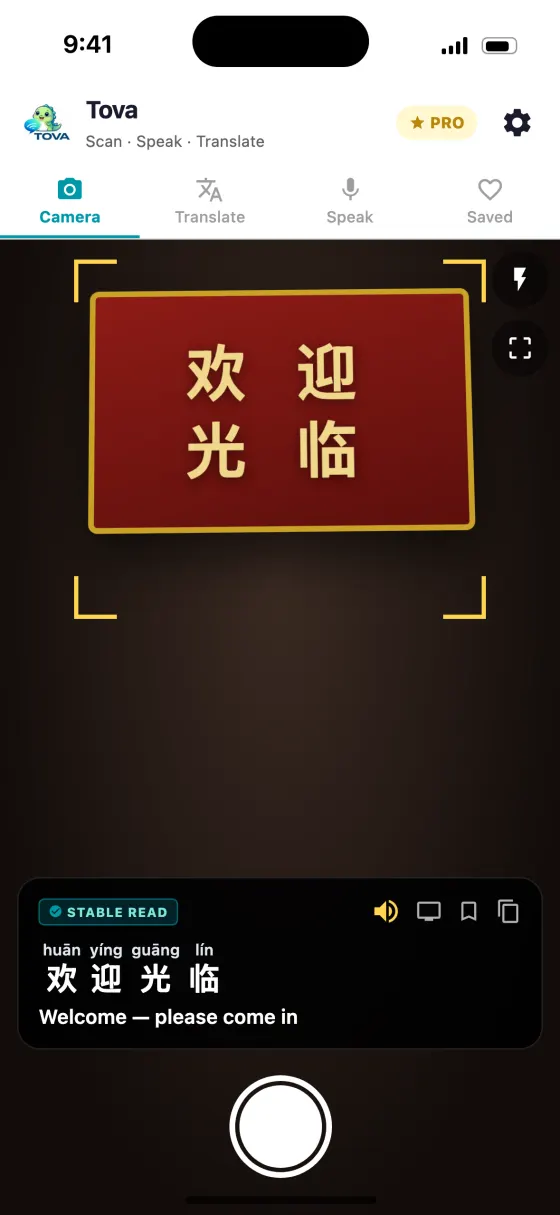
- Tap the shutter. The panel at the bottom shows each character with its pinyin above and the English underneath.
- Pinch to zoom into dense text, or crop to one line and translate just that part.
Why a translation is not enough
A translator tells you what a sign means. It does not tell you how to say it, and that matters more often than you would expect: asking a taxi driver for a street, ordering the dish you liked yesterday, checking you have the right station. In each case you need the sound of the Chinese, not the English.
Hanyu Pinyin is the standard way of writing Mandarin sounds in the Latin alphabet, with tone marks over the vowels. A pinyin camera app reads the characters and gives you that pinyin for each one. Tova shows it in a panel at the bottom of the camera screen, as tiles: the pinyin sits above each character, the translation underneath. The characters stay, so you can match what is on your screen to what is on the wall.
If you have text rather than a sign in front of you — a message, an address someone sent you — the free pinyin converter does the same thing in a browser.
What to look for in a pinyin camera app
| Feature | Why it matters |
|---|---|
| Tone marks, not plain letters | ma can mean mother, hemp, horse or scold. Without mā, má, mǎ, mà you cannot tell which. |
| Pinyin above each character | A pinyin sentence on its own does not show which syllable belongs to which character. Aligned readings teach you the characters as you go. |
| Keeps the characters | You need them to point at a menu or match a sign. An app that replaces them with English loses the one thing staff can read. |
| Reads polyphones by context | Some characters have two readings. Picking the right one needs the surrounding word, not a per-character lookup. |
| Works offline and in mainland China | Many translators depend on servers that are blocked in China or need signal you will not have underground. |
| Whole-page capture | One capture of a full menu beats scanning line by line. |
| Simplified and traditional | Mainland China uses simplified, Hong Kong and Taiwan traditional. The app should read both. |
| Audio | Hearing the word once fixes the tones better than reading them. |
| Cantonese option | In Hong Kong you need Jyutping, not pinyin. Pinyin gives the Mandarin reading. |
Swipe to see the whole table →
The polyphones a naive app gets wrong
Plenty of everyday characters have more than one reading, and the reading changes the meaning. An app that looks up each character on its own will pick the most common reading every time, and it will be wrong in some of the words you see most — including 银行, bank, on every high street.
| Character | Reading 1 | Reading 2 |
|---|---|---|
| 行 | xíng — walk, OK (不行 bù xíng) | háng — row, business (银行 yínháng, bank) |
| 乐 | lè — happy (快乐 kuàilè) | yuè — music (音乐 yīnyuè) |
| 长 | cháng — long (长城 Chángchéng) | zhǎng — grow, head of (校长 xiàozhǎng) |
| 重 | zhòng — heavy, important (重要 zhòngyào) | chóng — again (重庆 Chóngqìng) |
| 了 | le — particle (好了 hǎo le) | liǎo — understand (了解 liǎojiě) |
| 还 | hái — still (还有 hái yǒu) | huán — give back (还书 huán shū) |
| 觉 | jué — feel (觉得 juéde) | jiào — sleep (睡觉 shuìjiào) |
| 便 | biàn — convenient (方便 fāngbiàn) | pián — cheap (便宜 piányi) |
| 都 | dōu — all | dū — capital (首都 shǒudū) |
| 差 | chà — lacking (差不多 chàbuduō) | chāi — errand (出差 chūchāi, business trip) |
Swipe to see the whole table →
Reading a menu board
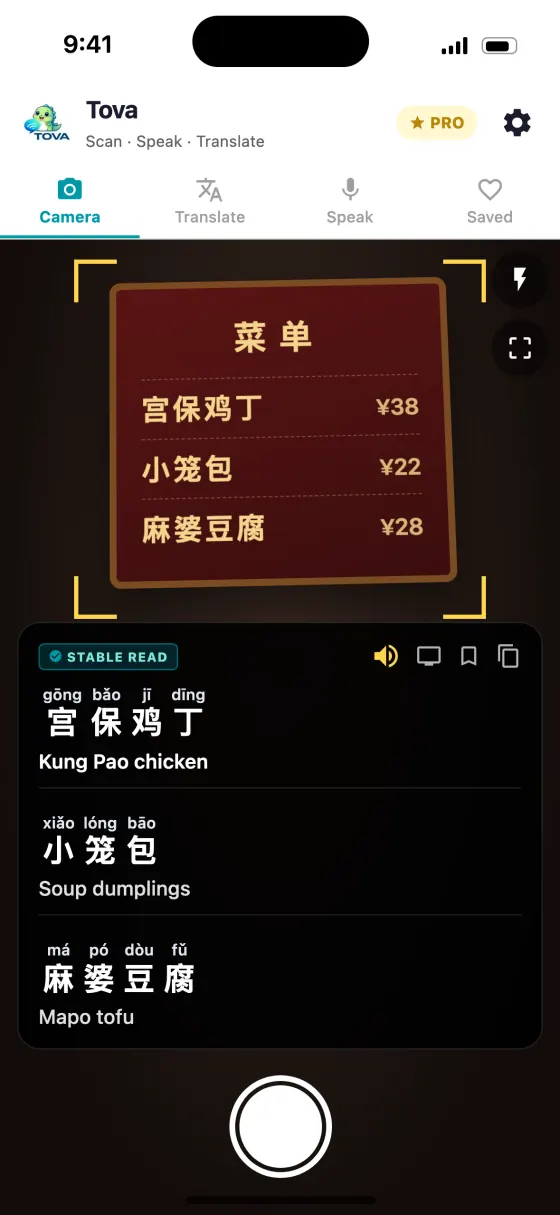
- Stand back far enough to get the whole board in frame. Menu boards above a counter are often long. One capture of the lot is better than three partial ones.
- Tap the shutter. The live view keeps up with what the camera sees, but the capture is what reads the full board in one go.
- Zoom into the section you care about. Pinch or double-tap to magnify the photo and pan around. If you only want one column translated, zoom into it and translate just what is on screen.
- Say the dish, then point. Read the pinyin aloud, tap to hear it if you are unsure, and point at the board as well. You will get a tone wrong; the pointing covers it.
Checking a street name for a taxi
Drivers rarely read pinyin, so do not show them your screen of romanisation. Show them the characters. Use the pinyin for yourself: to check the name on the street sign matches the address you were sent, and to say the name out loud when the driver asks. The readings above each character make it obvious when two place names differ by a single character, which a translation into English can hide.
Common mistakes
- Showing pinyin to Chinese speakers. Most people read characters, not pinyin. Pinyin is for your mouth; characters are for their eyes.
- Ignoring the tone marks. They are the pronunciation. shuìjiào and shuǐjiǎo are different words (sleep and dumplings).
- Expecting pinyin to work in Hong Kong. Cantonese reads the same characters differently. Switch to Cantonese for Jyutping.
- Trusting a live read of handwriting. The live scan is tuned for print. Tap the shutter for handwriting, and expect very cursive writing to fail sometimes.
- Assuming every reading is right. Polyphones, names and classical phrases can still come out with the wrong reading in any app. If a word matters — an address, a medicine — check it.
How Tova handles it
Text recognition and pinyin for each character run on your phone, so the live camera shows readings with no signal. When Tova has a connection, the readings for a capture are worked out with the surrounding words in view, which is how 银行 comes out yínháng rather than yínxíng. Offline, if Tova cannot reach its servers — no signal, flight mode, or blocked in mainland China — it falls back to on-device translation and still shows pinyin, though an unusual polyphone is more likely to slip.
For the basics of tones and why simplified and traditional are the same language, see reading Chinese characters with pinyin. For how Tova compares with the other translators people take to China, including where it loses, see the tested comparison of translator apps for China.
About this guide
Is there a camera app that shows pinyin?
Tova does. Point the camera at Chinese text, tap the shutter, and it shows each character with Hanyu Pinyin above it and the English meaning underneath, in a panel at the bottom of the screen. The pinyin is generated for the text in front of you rather than taken from a phrasebook, so it works on text nobody has translated before.
Does it use real tone marks?
Yes. Tova shows Hanyu Pinyin with tone marks, such as chūkǒu, rather than plain spelling, because tone is what separates otherwise identical syllables.
Does it get polyphones like 行 and 长 right?
When online, readings take the surrounding word into account, so 银行 reads yínháng and 长城 reads Chángchéng. No app gets every polyphone right, especially in names and classical phrases, so check anything important.
Can I zoom in on a photo I already scanned?
Yes. Pinch or double-tap to magnify the picture and pan around it. If you want only part of it translated, zoom into that region and translate just what is on screen.
Does the pinyin camera work without internet?
Yes. Text recognition and per-character pinyin run on your phone, so they work with no signal. When Tova cannot reach its servers, including inside mainland China without a VPN, translation falls back to on-device translation.
Can it read handwritten Chinese?
Often. Tap the shutter rather than relying on the live scan, which is tuned for print. Neat handwriting usually reads well; very cursive or messy writing can still fail.
Try it on the next menu or sign
Free on the App Store and Google Play. Works offline in China, no VPN.
Download on theApp StoreGet it onGoogle Play